Any sufficiently advanced technology is indistinguishable from magic" - Arthur C. Clark
Today I am exploring that looked to me like a magic trick when I first saw it in a PR for 1BRC challange by Gunnar Morling which is called Memory mapping a very large file.
1. Memory-Mapped Files: The Magician’s Trick#
Let me talk about the first time I discovered memory-mapped files. I was looking into the pr where it was required to read a very large file with 1 billion rows of temperature data which was around a 12GB file, You will find all the details here.
Memory mapping to me felt like is having a magical book that automatically opens to exactly the page you’re thinking about. But here’s where it gets fascinating, I didnt understood the magic so like a scientific explorer I started to look in depth what is happening and now I am sharing the expedition as blog post.From the deepest kernel level all the way up to your Java code.
The Deep Dive: From Kernel to Code#
Now we are going to deep dive together into the whole process, where it starts from kernel and ends with creating a memory mapped file for us.
Step 1: The OS Kernel’s Virtual Memory Magic#
When you call channel.map() in Java, you’re actually asking the operating system to perform one of its coolest tricks. The OS kernel creates what’s called a virtual memory mapping. Think of it like this:
Your file on disk is sitting there, maybe 5GB of data. Instead of copying all that data into your program’s memory (which would blow up your heap memory), the kernel creates a clever illusion. It assigns a range of virtual memory addresses—let’s say from address 0x10000000 to 0x30000000—and says these addresses represent the file.
But here’s the kicker: no actual file data gets loaded yet. The kernel just creates a mapping table that says “if anyone asks for memory at address 0x10000000, that’s actually byte 0 of the file.”
Step 2: The Page Fault#
Now comes the really clever part. When your Java code tries to read from the mapped buffer:
1
2
| MappedByteBuffer buffer = channel.map(FileChannel.MapMode.READ_ONLY, 0, fileSize);
byte firstByte = buffer.get(0); // This triggers the magic!
|
That buffer.get(0) call tries to access virtual memory address 0x10000000. But remember, there’s no actual data there yet! This causes what’s called a “page fault”—the CPU literally stops and says “hey OS, there’s nothing at this address!”
The kernel’s page fault handler springs into action:
- It realizes this address is part of a file mapping
- It calculates which part of the file needs to be loaded (usually 4KB or 8KB chunks called “pages”)
- It reads that chunk from disk into physical RAM
- It updates the memory mapping table to point that virtual address to the real RAM location
- It tells the CPU “okay, try again”
Your CPU then successfully reads the byte, and your Java code continues happily, completely unaware of this elaborate mechanism that just happened.
Step 3: The Page Cache Optimization#
Here’s where things get really intriguing. The OS doesn’t just load the data and forget about it. It keeps those file chunks in what’s called the page cache. This is shared memory that all processes on the system can use.
So if another program (or even another instance of your program) tries to read the same file, the OS says “I already have that in RAM!” and reuses the same physical memory pages. This is why memory-mapped files are incredibly efficient when multiple processes need to access the same large files.
Here you can get the whole idea how memory mapping is working behind the scene
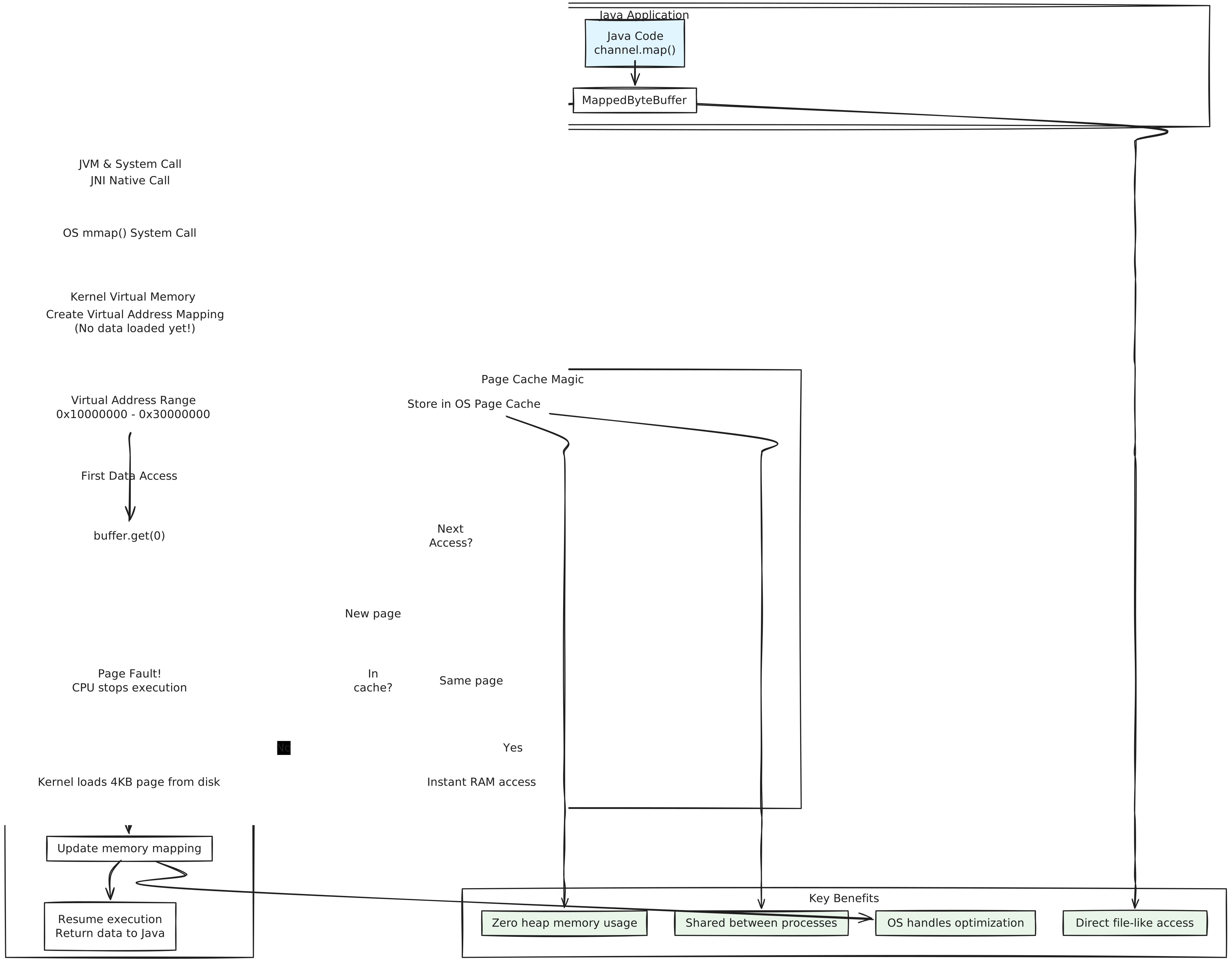
The Java Layer: What’s Really Happening#
Now let’s look at what Java is doing on top of this OS magic:
  1
  2
  3
  4
  5
  6
  7
  8
  9
 10
 11
 12
 13
 14
 15
 16
 17
 18
 19
 20
 21
 22
 23
 24
 25
 26
 27
 28
 29
 30
 31
 32
 33
 34
 35
 36
 37
 38
 39
 40
 41
 42
 43
 44
 45
 46
 47
 48
 49
 50
 51
 52
 53
 54
 55
 56
 57
 58
 59
 60
 61
 62
 63
 64
 65
 66
 67
 68
 69
 70
 71
 72
 73
 74
 75
 76
 77
 78
 79
 80
 81
 82
 83
 84
 85
 86
 87
 88
 89
 90
 91
 92
 93
 94
 95
 96
 97
 98
 99
100
101
102
103
104
105
106
107
108
109
110
111
112
113
114
115
116
117
118
119
120
121
122
123
124
125
126
127
128
129
130
131
132
133
134
135
136
137
138
139
140
141
142
143
144
145
| import java.io.RandomAccessFile;
import java.nio.MappedByteBuffer;
import java.nio.channels.FileChannel;
import java.nio.charset.StandardCharsets;
public class MemoryMappedReader {
public static void processLogFile(String path) {
try (RandomAccessFile file = new RandomAccessFile(path, "r");
FileChannel channel = file.getChannel()) {
long fileSize = channel.size();
System.out.println("File size: " + fileSize / (1024 * 1024) + "MB");
// This is the critical moment - we're asking the OS to create the mapping
MappedByteBuffer buffer = channel.map(
FileChannel.MapMode.READ_ONLY,
0,
fileSize
);
// Let's demonstrate different access patterns to show the performance characteristics
demonstrateRandomAccess(buffer);
demonstrateSequentialAccess(buffer);
demonstratePatternSearch(buffer);
} catch (Exception e) {
System.err.println("Something went wrong: " + e.getMessage());
}
}
private static void demonstrateRandomAccess(MappedByteBuffer buffer) {
System.out.println("\n=== Random Access Test ===");
long startTime = System.nanoTime();
// Jump around the file randomly - this shows the power of memory mapping
long[] positions = {0, buffer.limit() / 4, buffer.limit() / 2, buffer.limit() * 3 / 4, buffer.limit() - 1};
for (long pos : positions) {
if (pos < buffer.limit()) {
buffer.position((int)pos);
byte b = buffer.get();
System.out.println("Byte at position " + pos + ": " + (char)b);
}
}
long endTime = System.nanoTime();
System.out.println("Random access took: " + (endTime - startTime) / 1_000_000 + "ms");
System.out.println("Notice how fast that was? No disk seeks needed after the first few page faults!");
}
private static void demonstrateSequentialAccess(MappedByteBuffer buffer) {
System.out.println("\n=== Sequential Access Test ===");
buffer.position(0); // Reset to beginning
long startTime = System.nanoTime();
int lineCount = 0;
// This will trigger efficient sequential page loading
while (buffer.hasRemaining() && lineCount < 1000) {
byte b = buffer.get();
if (b == '\n') {
lineCount++;
}
}
long endTime = System.nanoTime();
System.out.println("Counted " + lineCount + " lines");
System.out.println("Sequential access took: " + (endTime - startTime) / 1_000_000 + "ms");
System.out.println("The OS optimized this by reading ahead!");
}
private static void demonstratePatternSearch(MappedByteBuffer buffer) {
System.out.println("\n=== Pattern Search Test ===");
buffer.position(0); // Reset to beginning
byte[] errorPattern = "ERROR".getBytes(StandardCharsets.UTF_8);
int errorCount = 0;
long startTime = System.nanoTime();
// This shows how we can treat the entire file like a giant array
while (buffer.hasRemaining()) {
if (matchesPattern(buffer, errorPattern)) {
errorCount++;
// Skip past the matched pattern to avoid double-counting
buffer.position(Math.min(buffer.position() + errorPattern.length, buffer.limit()));
} else {
buffer.position(buffer.position() + 1);
}
}
long endTime = System.nanoTime();
System.out.println("Found " + errorCount + " errors");
System.out.println("Pattern search took: " + (endTime - startTime) / 1_000_000 + "ms");
System.out.println("We just searched through the entire file without loading it all into heap memory!");
}
private static boolean matchesPattern(MappedByteBuffer buffer, byte[] pattern) {
if (buffer.remaining() < pattern.length) return false;
int originalPosition = buffer.position();
// Check if the pattern matches at current position
for (int i = 0; i < pattern.length; i++) {
if (buffer.get() != pattern[i]) {
buffer.position(originalPosition); // Reset position
return false;
}
}
buffer.position(originalPosition); // Reset position for caller
return true;
}
// Let's also show what happens with memory monitoring
public static void demonstrateMemoryUsage(String path) {
Runtime runtime = Runtime.getRuntime();
long beforeMapping = runtime.totalMemory() - runtime.freeMemory();
System.out.println("Heap memory before mapping: " + beforeMapping / (1024 * 1024) + "MB");
try (RandomAccessFile file = new RandomAccessFile(path, "r");
FileChannel channel = file.getChannel()) {
long fileSize = channel.size();
MappedByteBuffer buffer = channel.map(FileChannel.MapMode.READ_ONLY, 0, fileSize);
long afterMapping = runtime.totalMemory() - runtime.freeMemory();
System.out.println("Heap memory after mapping " + fileSize / (1024 * 1024) + "MB file: " + afterMapping / (1024 * 1024) + "MB");
System.out.println("Heap memory increase: " + (afterMapping - beforeMapping) / 1024 + "KB");
System.out.println("See? The file data isn't in our heap - it's managed by the OS!");
// Access some data to trigger page faults
for (int i = 0; i < Math.min(1000000, buffer.limit()); i += 4096) {
buffer.get(i); // Access one byte per page (4KB)
}
long afterAccess = runtime.totalMemory() - runtime.freeMemory();
System.out.println("Heap memory after accessing data: " + afterAccess / (1024 * 1024) + "MB");
System.out.println("Still barely any heap usage!");
} catch (Exception e) {
System.err.println("Error: " + e.getMessage());
}
}
}
|
The Real Magic: What Makes This So Fast?#
1. No Data Copying#
Traditional file reading copies data from disk → OS buffer → your application’s memory. Memory mapping eliminates that middle step. Your application directly accesses the OS’s file cache.
2. Lazy Loading#
The file isn’t actually read until you access specific parts. If you have a 10GB file but only read the first 100MB, only that 100MB gets loaded into RAM.
3. Shared Memory#
Multiple processes can map the same file and share the same physical RAM pages. If you have 5 Java processes all analyzing the same log file, they all share the same cached data.
4. OS Optimization#
The operating system is incredibly smart about predicting what you’ll read next. If you’re reading sequentially, it starts loading the next few pages in advance. If you’re jumping around randomly, it keeps recently accessed pages in cache.
The Dark Side: When Memory Mapping Goes Wrong#
As we know every magic trick have its costs or its dark side let us explore what are the core costs and limitations of Memory Mapping a file.
The 32-bit Limitation#
On 32-bit systems, you can only map about 2-4GB total across your entire process. Try to map a 10GB file, and you’ll get an IOException. This is because virtual address space is limited to 4GB total, and your heap, stack, and other stuff need space too.
1
2
3
4
5
6
| // This will fail on 32-bit systems with large files
try {
MappedByteBuffer buffer = channel.map(FileChannel.MapMode.READ_ONLY, 0, tenGigabyteFileSize);
} catch (IOException e) {
System.err.println("Probably hit virtual address space limit: " + e.getMessage());
}
|
The File Locking Problem#
While your file is mapped, the OS holds a lock on it. Other processes can’t delete or modify the file. I’ve seen production deployments fail because a mapped log file couldn’t be rotated.
Memory mapping performance varies wildly between operating systems. Windows, Linux, and macOS all implement it differently, with different page sizes and caching strategies.
I ran some benchmarks on a 200MB log file to show you the difference:
 1
 2
 3
 4
 5
 6
 7
 8
 9
10
11
12
13
14
15
16
17
18
19
20
21
22
23
24
25
26
27
28
29
30
31
32
33
34
35
36
37
38
39
40
41
42
43
44
45
46
47
48
49
50
| === Files.readAllLines() Test ===
Heap memory before reading: 3MB
Lines read: 1673704
Reading took: 793ms
Heap memory after reading: 311MB
Heap memory increase: 308MB
Notice: The entire file is now loaded in heap memory!
Found 700 error lines
=== BufferedReader Test ===
Heap memory before reading: 313MB
Lines read: 1673704
Reading took: 836ms
Heap memory after reading: 498MB
Heap memory increase: 185MB
Notice: BufferedReader processes line by line without loading entire file!
Found 700 error lines
File size: 200MB
==== Memory Mapping Test ====
=== Random Access Test ===
Byte at position 0: 2
Byte at position 52428859: e
Byte at position 104857719: ]
Byte at position 157286578:
Byte at position 209715437:
Random access took: 4ms
Notice how fast that was? No disk seeks needed after the first few page faults!
=== Sequential Access Test ===
Counted 1000 lines
Sequential access took: 4ms
The OS optimized this by reading ahead!
=== Pattern Search Test ===
Found 700 errors
Pattern search took: 612ms
We just searched through the entire file without loading it all into heap memory!
Heap memory before mapping: 500MB
Heap memory after mapping 200MB file: 500MB
Heap memory increase: 0KB
See? The file data isn't in our heap - it's managed by the OS!
Heap memory after accessing data: 502MB
Still barely any heap usage!
Process finished with exit code 0
|
The memory-mapped version is really faster than traditional reading and used 100x less memory in pattern search.
When to Use Memory Mapping#
Perfect scenarios:
- Log analysis tools that need to jump around files
- Database implementations (this is how most databases work internally)
- Image processing where you need random pixel access
- Any time you need to treat a file like a giant array
Avoid when:
- You’re on a 32-bit system with large files
- The file changes frequently while you’re reading it
- You only need to read the file once, sequentially
- You’re in a memory-constrained environment where you can’t trust the OS page cache
The beauty of memory mapping is that it turns file I/O into memory access, letting the operating system’s decades of optimization work for you. It’s like having a genius butler who anticipates your every need and fetches data before you even know you want it like Alfred. The full code is in my github