In the vast realm of Java programming, security is not just a feature; it’s a necessity. In this article, we’ll embark on a journey to explore the intricate world of Java security by crafting a toy TLS server using the Java Security API. Buckle up as we delve into the nuts and bolts of secure communication!
Setting the Stage
Before we dive into the code, let’s set the stage. Understanding the basics of TLS (Transport Layer Security) is crucial. We’ll discuss why secure communication is essential and lay the groundwork for our TLS server.
TLS
Transport Layer Security (TLS) is a cryptographic protocol that ensures privacy and data integrity between two communicating applications over a network. It is widely used to secure communication over the internet, particularly in web browsers accessing websites, email communication, and other applications that require secure data transmission.
Here’s an overview of how TLS works:
Handshake Protocol:
- ClientHello: The process begins with the client sending a “Hello” message to the server, specifying the supported cryptographic algorithms and other parameters.
- ServerHello: The server responds with its own “Hello” message, selecting a cryptographic algorithm and other parameters from the client’s list.
- Key Exchange: The server provides its public key to the client, and they agree on a pre-master secret, which will be used to generate encryption keys.
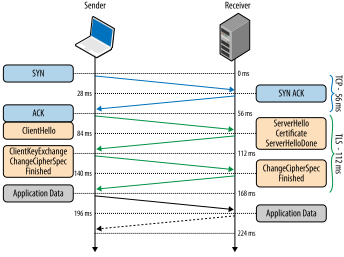
Key Exchange:
- The client encrypts the pre-master secret using the server’s public key and sends it back to the server.
- Both the client and server independently generate a session key from the pre-master secret.
Authentication:
- The server may provide a digital certificate to prove its identity. The client verifies the certificate’s authenticity using a trusted Certificate Authority (CA).
- Optionally, the client may also provide its own certificate for server authentication.
Session Key Establishment:
- The client and server use the agreed-upon session key to generate encryption keys for securing the data transmission.
Secure Data Transmission:
- With the session keys established, the client and server use symmetric encryption to secure the data exchanged during the session.
- TLS provides confidentiality by encrypting the data, integrity by using Message Authentication Codes (MACs), and authenticity through digital certificates.
Finished:
- Both the client and server send a “Finished” message to confirm that the handshake is complete. The encrypted session is now established.
How TLS uses Key Pair
TLS uses key pairs, consisting of a public key and a private key, to secure communications over the internet. These keys serve various purposes during the TLS handshake process:
Authentication:
- Server Authentication: The server presents its public key certificate during the handshake to prove its identity. The client can verify the server’s authenticity using a trusted Certificate Authority’s public key.
- Client Authentication (Optional): In cases requiring mutual authentication, the client also presents its public key certificate to the server.
Key Exchange:
- TLS employs asymmetric key exchange algorithms to establish a shared secret key between the client and server. The public keys in the key pairs facilitate a secure exchange, ensuring that eavesdroppers cannot intercept the shared secret.
Data Encryption:
- Once the shared secret is established, symmetric encryption algorithms are used for efficient data encryption. The security of the initial key exchange, facilitated by the key pairs, is crucial for protecting the confidentiality and integrity of the transmitted data.
Perfect Forward Secrecy (PFS):
- TLS emphasizes Perfect Forward Secrecy, ensuring that compromising long-term private keys does not compromise past communications. Key pairs play a role in achieving PFS, especially with algorithms supporting forward secrecy. %%
TLS In Java
In Java, TLS is typically implemented using the Java Secure Socket Extension (JSSE) framework, which provides the necessary classes for secure communication.
Now let’s see how can we construct and toy TLS server and understand how it works
Code Crafting Begins
Now, the real fun begins. We’ll start coding our toy TLS server step by step. From setting up the server socket to handling client connections, we’ll navigate the Java Security API to ensure our server stands robust in the face of potential threats.
| |
SSL Context
Now lets understand the above code step by step to get understanding how it’s communicating using TLS
| |
here we are instantiating SSLContext which is the main api that’s driving the security of the communication. We are requesting the SSLContext with "TLS" and then initializing it with KeyManagers from keyManager factory. Now let us understand what is KeyManagerFactory
KeyManager and KeyStore
In Java, a KeyManager is part of the Java Secure Socket Extension (JSSE) and is responsible for managing key materials for key exchange during SSL/TLS communication. It works in conjunction with TrustManager and SecureRandom to provide a comprehensive security framework for Java applications.
In Java, a KeyStore is a repository that stores cryptographic keys and their associated X.509 certificate chains. It is a fundamental component of the Java Cryptography Architecture (JCA) and is used for managing cryptographic keys, certificates, and related information in a secure manner. The KeyStore class is part of the java.security package.
KeyStores are commonly used in various security-related operations, such as SSL/TLS communication, code signing, and digital signatures.
Now lets instantiate a KeyManager and then use keystore to store the keypair
| |
here we are instantiating KeyManagerFactory which manages keyStores which in turns manages keypair. Here we are creating a key manager by pointing it to an already created keystore and then initializing it.
KeyPair Generation
Keys are the backbone of encryption. We’ll explore the art of KeyPair generation. To generate key pair we need to create a keystore as keys and certificates are stored inside the keystore.
To generate a Java KeyStore (JKS) file, you can use the keytool command-line utility that comes with the Java Development Kit (JDK). Below is an example command to generate a simple self-signed certificate and store it in a JKS file named keystore.jks. This example uses a 2048-bit RSA key for simplicity:
| |
this command does the following
-genkeypair: Generates a key pair (public and private keys).-keyalg RSA: Specifies the key algorithm (RSA in this case).-keysize 2048: Specifies the key size (2048 bits in this case).-alias mykey: Specifies the alias for the key pair.-keystore keystore.jks: Specifies the name of the keystore file.-validity 365: Specifies the validity period of the key pair in days.-keypass keyPassword: Specifies the password for the private key.-storepass keystorePassword: Specifies the password for the keystore.-dname "CN=MyKey, OU=MyOrganizationalUnit, O=MyOrganization, L=MyCity, ST=MyState, C=MyCountry": Specifies the distinguished name (DN) for the certificate.
After running this command, you will have a keystore.jks file in your working directory. Remember to replace placeholder values (like passwords and distinguished name) with your own values.
SSL Server Socket Setup
An SSL Server Socket, or SSLServerSocket, is a class in Java that represents a server-side endpoint for SSL/TLS-secured communication. It is part of the Java Secure Socket Extension (JSSE) and is used for establishing secure connections between servers and clients over a network.
here we are creating a SSLServerSocketFactory that will provide us with a server socket connection. Then we configure the socket with which port it will listen. In this example I have selected 8888 as the port. The SSLServer will listen on this port. Furthermore we call accept() on SSLServerSocket which will now accept connections.
| |
Input and Output Stream Setup
After that we setup input and output stream for incoming and sending data back to client. SSLServerSocket includes an InputStream which alongside with a reader we can get client data and show it
| |
to learn more about tls https://hpbn.co/transport-layer-security-tls/