After Day 98, I wanted to test a narrower question: when does a virtual-thread server behave differently from an event-loop server?
I built one server for each model and published the code and benchmark scripts. The comparison does not establish a universal winner. It shows how the models behave under one recorded workload and makes that workload repeatable.
Test context
- Repository: virtual-thread-eventloop-test
- Runtime requirement: JDK 21 or later
- Recorded machine: Windows, 16 CPU cores, 31.82 GB RAM, and 183 GB free disk
- Server heap: 4 GB for each implementation
- Load generator: Bombardier with 14 worker threads
- Commands and raw-analysis steps:
benchmarks/README.mdandbenchmarks/QUICK-REFERENCE.mdin the repository
The recorded results are a sample run, not a production load test. Hardware, network topology, request mix, warmup, heap size, and connection behavior can change the outcome.
Why compare the models
Virtual threads make blocking I/O practical at high concurrency while keeping sequential control flow. Event loops use a smaller number of threads and explicit state machines to manage many connections. Both models remain useful because they optimize different constraints.
Virtual threads can unmount from a carrier thread during supported blocking operations, allowing that carrier to run other work. This keeps sequential control flow practical for request handlers that wait on databases, remote APIs, or files.
But reactive frameworks don’t work this way. They use event loops: one thread handles thousands of connections by multiplexing I/O events. No mounting. No unmounting. No stack switching. Just a tight loop reading from a Selector.
I needed to understand both models to know when each wins.
Non-Blocking I/O: The Foundation
Platform-thread-per-request designs can spend substantial resources on threads that are waiting. Virtual threads reduce that cost, but their stack chunks and application state still consume memory, and scheduling is not free. Measure those costs under the intended concurrency and workload.
Non-blocking I/O takes a different approach: one thread, many connections, explicit multiplexing.
What is I/O multiplexing
I/O multiplexing breaks down to kernel-level efficiency: one thread polls multiple file descriptors via system calls like select()/poll()/epoll(), reacting only to ready I/O events to avoid per-connection blocking.
At the OS kernel level, I/O operations cross between user space and kernel space. With a platform-thread-per-connection design, a blocking socket.read() leaves that thread waiting for data. Large connection counts can therefore make thread memory and scheduling part of the system’s resource budget.
Multiplexing inverts this model. Instead of one thread per connection, one thread monitors many connections. The kernel tells you which connections are ready for I/O, and you react only to those.
Here’s how it works at the kernel level:
The select() system call (or epoll on Linux, kqueue on macOS) takes a set of file descriptors with interest operations (read/write/accept), atomically blocks until any file descriptor signals readiness via kernel events, then returns a bitmask of ready file descriptors all without per-fd polling.
How It Works In Java
Java NIO’s Selector wraps this mechanism. On Linux, the JDK can use an epoll-backed selector. The selector maintains registered channels and their interest operations. When you call selector.select(), it waits until at least one channel is ready, then returns the ready keys.
Non-blocking channels ensure read()/write() return immediately they never block. If data isn’t ready, read() returns 0 bytes. If the socket buffer is full, write() returns 0 bytes written. This forces applications to re-check readiness via selector keys in the event loop.
ByteBuffer manages data with position/limit/capacity semantics. After reading, you call flip() to prepare for consumption: it sets limit = position and position = 0. This is critical without flip(), you’ll read from the wrong position or read garbage data.
The Reactor Pattern layers on top of multiplexing. It consists of:
- Acceptor: Handles new connections, registers clients with the selector
- Demultiplexer: The
Selector.select()call that waits for events - Dispatcher: Routes
SelectionKeyevents to appropriate handlers - Handler: Business logic that processes the I/O event
Java frameworks such as Netty and Reactor Netty build on event-loop designs. A Reactor Netty TcpServer, for example, uses Netty event-loop groups and exposes work through reactive streams. The achievable connection count depends on buffers, application state, traffic, operating-system limits, and hardware.
A single-thread event loop processes sequentially: select → dispatch → callback.
If a handler blocks, it stalls the entire loop that’s why reactive frameworks emphasize non-blocking handlers.
The key lifecycle per channel:
- Register interest operations (e.g.,
OP_ACCEPTfor server sockets,OP_READfor client sockets) select()yields a set of ready operations (readyOps)- Process the event (read → flip buffer → handle → set
OP_WRITEif partial write) - Cancel the key after use to avoid duplicate events
Here’s a minimal example showing the pattern:
| |
This ping-pongs data efficiently. For production systems, you’d add write queues (only register OP_WRITE when the queue is non-empty) and handle partial reads/writes properly. See in the below diagram how this event loop works.
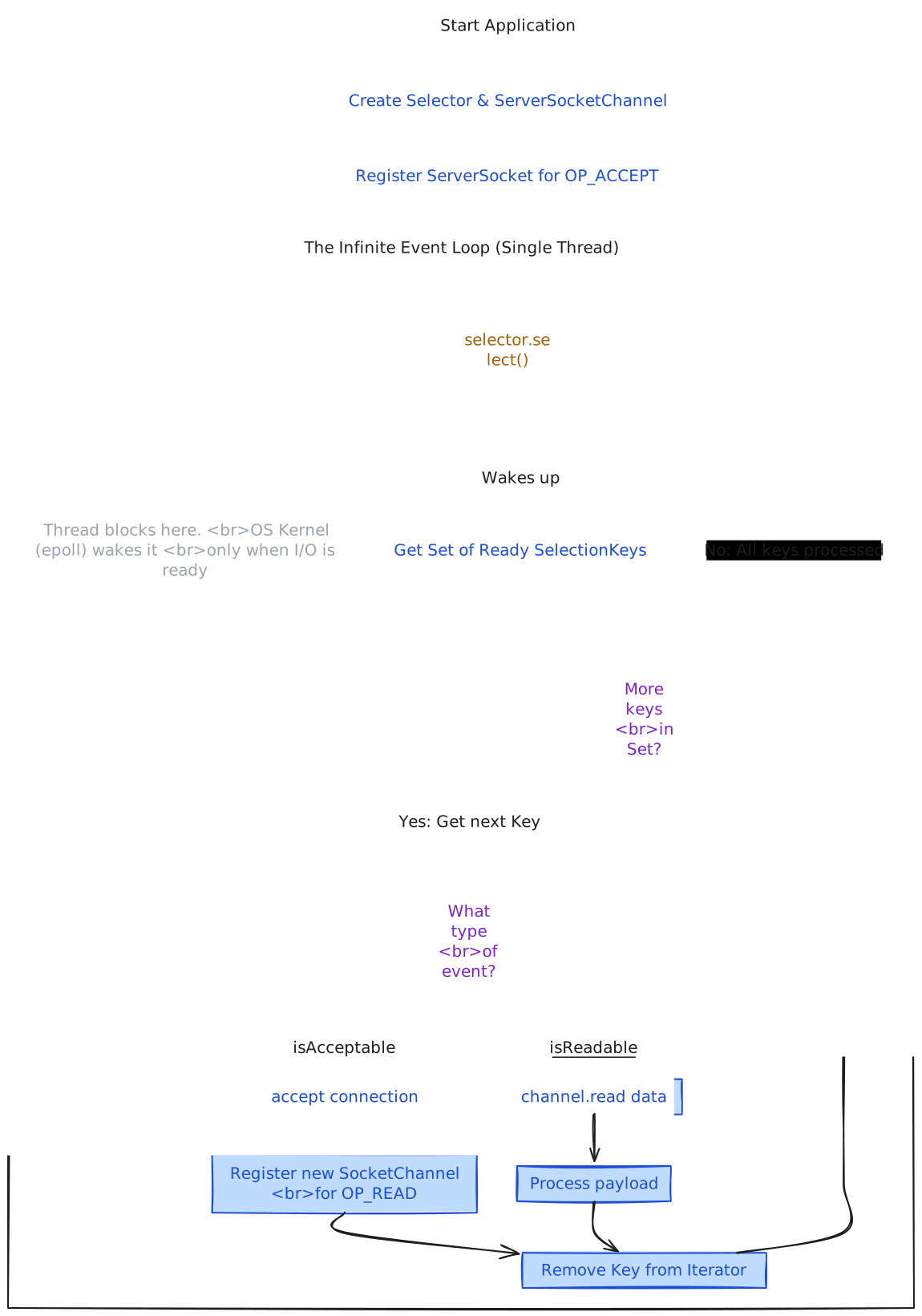
The selector waits when no registered I/O is ready. When a channel becomes ready, the loop processes that event without assigning a dedicated platform thread to every idle connection. The design still has scheduling, system-call, buffer, and handler costs; it changes where those costs appear.
Here’s the core pattern using Java NIO:
| |
This is the foundation. One thread handles all connections. The Selector monitors multiple channels. When data arrives, the selector wakes up with ready events. We handle them without blocking.
Key insight: selector.select() is the only blocking call. Everything else accept(), read(), write() returns immediately. If data isn’t ready, the operation returns zero bytes. No waiting.
Building an Event Loop HTTP Server
The pattern above is raw NIO. Let’s build something more real: an HTTP server using the event loop pattern.
Event loop = infinite loop + selector + event handlers + state machines.
Here’s an instructional implementation for the comparison:
| |
The event-loop server listens on port 8081. This command is a quick exploratory run; the recorded comparison later in the article comes from the repository’s multi-phase benchmark suite.
| |
Each connection is represented by state such as READING → WRITING → READING. The event loop transitions that state when I/O is ready instead of assigning a platform thread to each connection.
Virtual Threads vs Event Loops: The Real Trade-offs
The comparison is easier to reason about as a set of trade-offs:
| Aspect | Virtual Threads (Blocking I/O) | Event Loops (Non-blocking I/O) |
|---|---|---|
| Programming Model | Sequential, imperative | Callback-based, state machines |
| Memory model | Stack chunks plus request state | Explicit connection state and buffers |
| Scheduling work | Virtual-thread scheduling and mount/unmount behavior | Event dispatch and state-machine transitions |
| Debuggability | Sequential control flow and familiar stack traces | Traces can cross asynchronous boundaries |
| Connection ceiling | Depends on heap, workload, and runtime behavior | Depends on state, buffers, OS limits, and workload |
| Code complexity | Often simpler for branching business logic | Requires disciplined non-blocking handlers and state management |
| Useful starting point | Blocking request handlers and service orchestration | Connection-heavy infrastructure with controlled I/O scheduling |
When to Use Virtual Threads
I use virtual threads when:
Complex business logic: Multiple database calls, service calls, and branching logic can be easier to follow in sequential code.
For example, a request that coordinates several remote calls can retain ordinary control flow while each virtual thread waits independently. Whether that improves maintainability depends on the framework, observability, and team conventions.
Blocking I/O workloads: Virtual threads are a reasonable model to test when requests spend much of their time waiting on supported blocking operations. Heap use, pinning, and downstream limits still need measurement.
Team velocity: Most developers understand sequential code. Onboarding is faster. Code reviews are easier. Bugs are simpler to fix.
Here’s a basic HTTP server implementation using virtual threads:
| |
Total blocking time: ~10ms per request. With platform threads, this ties up a thread for 10ms. With virtual threads, the carrier thread stays free. The virtual thread unmounts at each blocking call. Other virtual threads run.
When to Use Event Loops
I use event loops when:
Connection-heavy workloads: Event loops are worth testing when explicit control over I/O scheduling and per-connection state is more important than sequential request code.
Simple request/response patterns: API gateways, load balancers, WebSocket servers, streaming proxies. The logic is simple: read request, forward it, write response. State machines work fine here.
Explicit resource control: A small event-loop pool can make thread ownership predictable, but buffers, queues, callbacks, and application state still consume memory. Benchmark the complete process rather than comparing thread counts alone.
The Hybrid Approach
A system can use both models. An event loop can own network I/O while other executors handle work that would otherwise block the loop. The handoff adds coordination cost, so it should be justified by measurements and framework behavior.
Pattern:
| |
Event loops handle I/O multiplexing. Virtual threads handle business logic. Best of both worlds.
Benchmarks and Repo: Putting Both to the Test
To validate the trade-offs with real numbers, I added a benchmark suite to a small project that runs both implementations side by side. The repo is virtual-thread-eventloop-test and is set up so you can run the same tests and draw your own conclusions.
Repo Layout
Here is the project link GITHUB .The project contains two HTTP servers and a 4-phase benchmark suite:
VirtualThreadsHttpServer(port 8080) Java 21HttpServerwithExecutors.newVirtualThreadPerTaskExecutor(). Each request runs on a virtual thread and does ~10 ms simulated blocking work (e.g. DB/REST). Simple sequential handler.EventLoopHttpServer(port 8081) Single-thread NIO server: oneSelector, non-blockingServerSocketChannel/SocketChannel, and the same 10 ms work simulated inside the event loop (no virtual threads). Pure reactor style.
Both servers expose the same JSON endpoint and the same simulated workload so the comparison is about concurrency model, not API shape. Build with Maven; the pom.xml produces two runnable JARs: virtual-thread-app and event-loop-app.
Benchmark Suite (4 Phases)
The benchmarks folder holds a hypothesis-driven suite that measures throughput, latency, and resource use:
| Phase | What it does | Goal |
|---|---|---|
| Phase 1: Baseline | Fixed loads (e.g. 100, 1K, 10K connections), 10s–300s, multiple runs | Establish normal throughput and latency patterns. |
| Phase 2: Progressive stress | Ramp connections from 100 → 50K (e.g. +1K every 30s) | Find where each implementation degrades or fails. |
| Phase 3: Spike | Baseline (1K conn) → spike (10K conn) → back to 1K, repeated cycles | Observe recovery and stability. |
| Phase 4: Endurance | Constant load (e.g. 5K connections) for several hours per server | Check for memory growth and long-term stability. |
Load is generated with Bombardier (Go-based HTTP benchmark). The repo includes bombardier.exe in the scripts for Windows, so you can run the suite natively. The suite can collect JFR, JMX (e.g. VisualVM), and system metrics; the analyze-and-report script turns raw results into CSVs and a FINAL-REPORT.md in benchmark-results/.../analysis/.
Results From a Sample Run
Test machine (from the benchmark run’s config.json): 16 CPU cores, 31.82 GB RAM, 183 GB free disk. Each server ran with 4 GB heap (-Xmx4096m). Bombardier used 14 worker threads. Windows host.
From one full run (Phase 1–3; Phase 2 summary and report):
- Peak throughput: Event Loop ~4,627 req/s vs Virtual Threads ~3,926 req/s event loop ahead under this workload.
- Breaking point (Phase 2): Both hit limits around 15,000 connections in that environment (stress ramp).
- Winner in this setup: Event Loop, for peak RPS, with both degrading at similar connection counts.
So for this “many connections, small fixed delay per request” scenario, the single-thread event loop gave higher throughput, while virtual threads stayed in the same ballpark and remained predictable. Your mileage will depend on hardware, OS, and actual workload (e.g. real DB or HTTP calls).
How to Run It Yourself
- Clone/build: Open the virtual-thread-eventloop-test repo, build with Maven (
mvn package). Use JDK 21+. - Start both servers with enough heap (e.g.
-Xmx4096m) and JMX if you want VisualVM. Virtual threads on 8080, event loop on 8081. - Run the benchmark orchestrator from the
benchmarksfolder (seeREADME.mdandQUICK-REFERENCE.md). The suite uses Bombardier for load generation (e.g.bombardier.exeon Windows); ensure both servers are reachable from the machine running the benchmark. - Analyze: Run the analysis script to generate
FINAL-REPORT.mdand the CSV summaries underbenchmark-results/.../analysis/.
The README in benchmarks explains the hypothesis template (predict VT vs EL before running), what to monitor in VisualVM, and how to interpret throughput, latency percentiles, and breaking points. Repeating the suite on your own machine is a good way to see how the two models behave under your constraints.
Choosing a model
Here’s my mental model :
For request handlers that spend most of their time waiting on blocking I/O, virtual threads are a reasonable first model to test. Event loops remain useful when connection density, memory, or control over I/O scheduling dominates the design. Measure the real workload before choosing.
Test event loops when: The service owns many connections, handlers can remain non-blocking, and control over I/O scheduling or per-connection state is central to the design.
Test a hybrid when: The network layer benefits from event loops but some application work is clearer or safer on a separate executor. Include the handoff and queueing behavior in the test.
The right tool depends on the workload. Virtual threads make blocking I/O practical at higher concurrency, while event loops retain value when explicit I/O scheduling and connection state are the dominant concerns.
What I Learned
Virtual threads and event loops solve different problems:
Virtual threads: Make many blocking-I/O workloads easier to express with sequential code. They reduce reliance on large platform-thread pools but do not remove downstream capacity limits or the need to observe runtime behavior.
Event loops: Centralize readiness-driven I/O and make connection state explicit. They can suit infrastructure-style workloads when handlers remain non-blocking and the state-machine complexity is acceptable.
Understanding both models gives you the full picture of Java’s I/O concurrency landscape. You can make informed decisions based on your actual constraints, not hype or cargo-culting.
Next time you’re designing a system, ask: What’s the connection pattern? What’s the business logic complexity? What are the memory constraints? Then choose the right model.
Both are tools. The benchmark gives you a starting point, not a verdict.
Limitations
The sample run used one Windows machine and synthetic request patterns. It does not cover production network latency, database contention, long-lived WebSocket traffic, container limits, or failure recovery. Re-run the suite with the traffic shape and resource limits that matter to your system.